
Want to see how a different face would look in your favorite photo or video? Deepswap gives you a simple way to make that change online. Upload a picture, choose a face, and let the AI create a new version. You can also make AI character images and turn still pictures into short videos.
Deepswap is different from most AI girlfriend apps. It focuses on visual content rather than conversations with virtual women. You can make character photos and edit fictional scenes, but there is no AI girlfriend chat.
In this Deepswap review, our team looks at its main tools, credit costs, paid plans, and safety rules. We’ll help you decide whether the service fits your needs.
Deepswap Quick Verdict: Our Rating
Our rating: 7/10
Deepswap is a good choice for people who want to edit faces in photos and videos without learning complex software. It supports single and group face swaps, GIFs, AI character images, and video generation.
The main advantage is having several visual tools in one place. You can work with a photo, change a face, or create a video from a picture. Deepswap also supports HD face swaps and can process videos up to 30 minutes with PRO access.
The credit system needs some planning. Photo swaps cost little, but longer videos can use more credits. The service also has strict content rules and limited free access.
Our 7/10 rating reflects its published features, costs, and policies.
What Is Deepswap AI and How Does It Work?
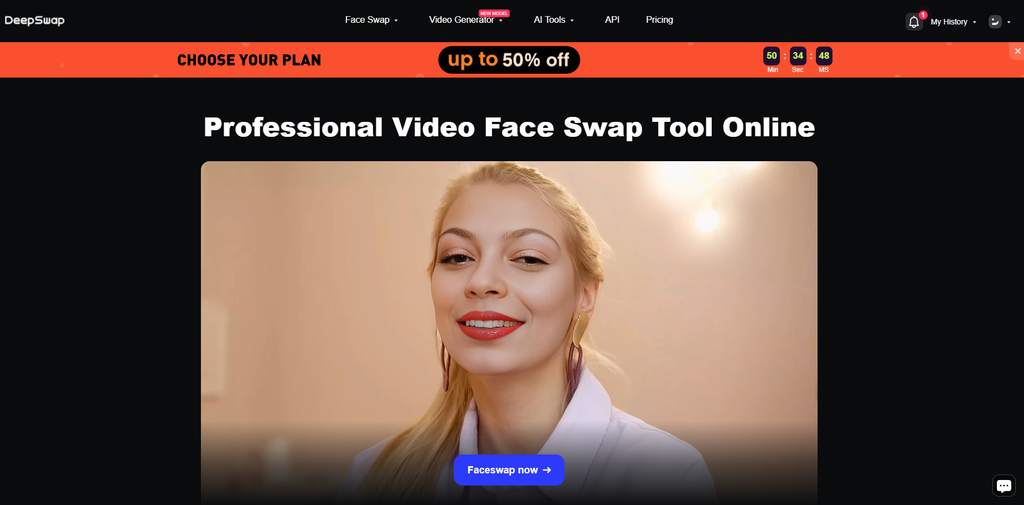
Deepswap is an online AI face editor available at the website. It uses artificial intelligence to replace faces in existing pictures, GIFs, and videos.
The process is simple. You upload the file you want to edit, add a reference face, and choose the result you want. The AI finds the face in your original file and creates a new version.
You can use Deepswap through a web browser on a computer or mobile device. Its main editing tools work online, so you don’t need a powerful computer to process large AI models yourself.
The platform also offers AI video generation, image editing, and AI Character tools. Deepswap is mainly made for people who want to create visual content. You might use it for a funny group picture, a fictional character portrait, or a short video scene. Unlike a standard AI companion app, Deepswap doesn’t offer virtual relationships, personal conversations, or characters with long-term memories.
What Are the Main Features of Deepswap?
Deepswap puts face editing and media creation at the center of its service. You can work with existing files or generate new images and videos. The platform has different tools for each task. Some replace faces, while others change the look of an image or create motion from a still picture.
How to Create and Customize AI Characters With Deepswap
Deepswap includes an AI Character feature for making character pictures. It lets users generate visual characters rather than build AI companions with chat personalities. You can create images of fictional women or other characters and use them in visual projects. The result is an image, not a virtual person who can send messages.
The tool charges 0.2 credits for each generated character photo. To make an AI character image, follow these steps:
- Open Deepswap and sign in.
- Find the AI Character tool.
- Choose the available character settings.
- Set the appearance and style you want.
- Review the credit cost.
- Generate the character image.
- Save the result for later use.
You can also edit an existing image with Deepswap’s other tools. For example, you may want to improve a portrait or change its background.
Character creation is useful for people who need pictures for stories, profiles, or other visual projects. However, the platform doesn’t let you give these characters full chat personalities or relationship settings.
Does Deepswap Have Pre-Made AI Girlfriends?
Deepswap doesn’t have a normal AI girlfriend gallery with profiles you can chat with. Instead, the service provides image examples, face swap tools, and visual content options. You can work with a picture of a fictional woman or upload a reference photo that you have permission to use.
The website shows examples of face swaps and different image styles. These help you understand what the tools can do. Some people may want to make several pictures of the same fictional woman. You can use reference images to guide your edits, although results may change between generations.
If you’re looking for a large library of virtual girlfriends with names, personalities, and stories, a dedicated AI companion app will suit you better.
Can You Chat With AI Characters on Deepswap?
Deepswap is not designed for personal AI conversations. There is no standard text chat where a virtual girlfriend replies to your messages. The text boxes in its creative tools are used to describe pictures or videos. You enter a prompt about the scene you want, and the AI generates visual content. For example, you can describe a fictional woman standing in a garden or ask for a portrait with different lighting.
The system processes your request as a media task. It doesn’t respond as a character or carry on a personal conversation. Deepswap also has no normal chatbot memory feature. You can save your work, but your generated characters don’t remember past talks or learn about your interests through chat.
Can You Create Roleplay Scenes With Deepswap?
Deepswap supports visual storytelling rather than interactive roleplay conversations. You can create a picture or video that shows a fictional scene. For example, you might make a fantasy portrait, a film-style image, or a short scene with a character in a new setting.
The face swap tool also lets you replace faces in existing media. This can be useful for fictional film projects when you own the source material or have permission from everyone shown.
You control the scene through your selected files and prompts. The AI creates the visual result. There is no ongoing conversation with the people shown in the images. If you prefer story-based chats where characters respond to your choices, you’ll need a separate AI roleplay platform.
Does Deepswap Allow NSFW Content?
Deepswap is not an NSFW AI girlfriend service. Its official Terms of Service prohibit pornographic, obscene, and other restricted material.
The rules also prohibit content that breaks another person’s privacy or image rights. Users must have the right to upload the pictures and videos they submit.
This is especially important for face swaps. Replacing someone’s face in an intimate image without consent can cause serious harm and may break the law.
Deepswap can reject or remove content that goes against its policies. The official FAQ also explains that users can report images that have been flagged by its content checks. For adult AI roleplay and sexual content, Deepswap is not the right platform. Its main purpose is general face editing and media creation within the service rules.
How Does Deepswap AI Image Generation Work?
Deepswap has several tools for creating and editing pictures. Face Swap is the main feature, but the platform also offers AI Character, image enhancement, background removal, and cartoon-style effects.
Face swapping works by combining two images. One provides the scene, while the other provides the face you want to use. The basic process takes only a few steps:
- Upload the photo you want to edit.
- Add a clear reference picture of the face.
- Choose which face to replace.
- Select the available quality options.
- Check the credit charge and start the swap.
- Preview the result and download the finished image.
Deepswap recommends using clear, front-facing photos. Strong side angles, covered faces, and fast movement can affect how well the AI follows facial details. The website also promotes multi-face swapping. You can replace several faces in a group image or video, which is useful for fictional scenes with more than one character.
Photo Face Swap costs 0.1 credit per image. AI Character costs 0.2 credit, and other image tools generally cost 0.1 credit per photo.
If you mainly want to create female character pictures, the AI Character and photo editing tools are the best places to start.
Can You Generate AI Videos With Deepswap?
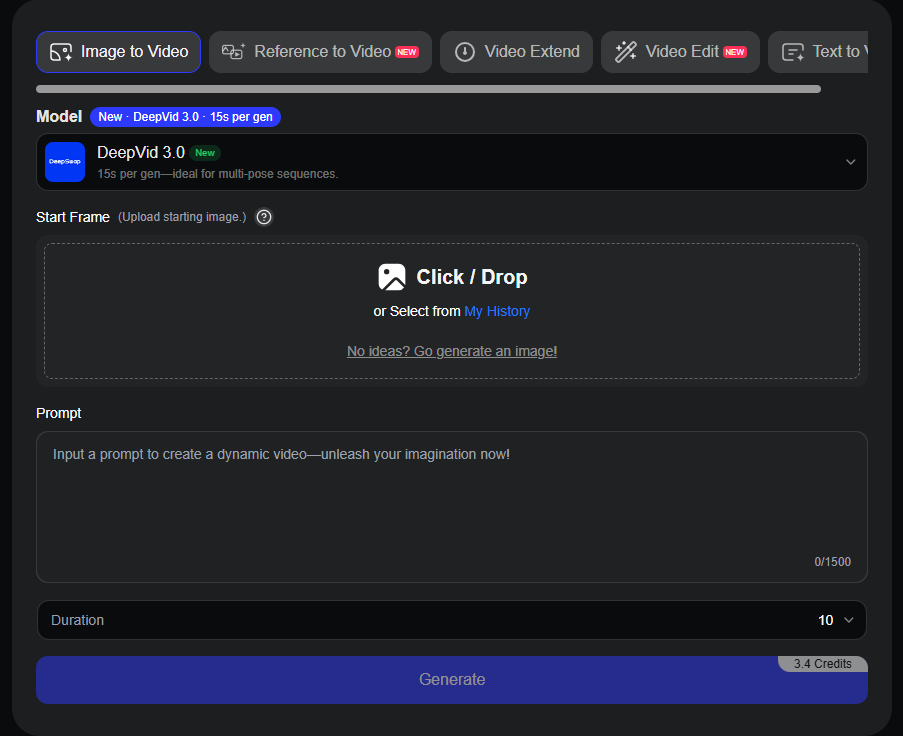
Yes. Deepswap offers video face swapping and a separate AI video generator. Video Face Swap changes faces in an existing clip. The platform advertises support for replacing up to six faces in one video. PRO members can work with videos up to 30 minutes long.
The video generator works differently. It lets you start with a picture or a written prompt and create a new moving scene. Deepswap offers several video models, including DeepVid 3.0 and DeepEcho 2.0. Some models also support generated audio.
The available video tools include:
- Video Face Swap: Replace faces in an existing clip.
- Image to Video: Create motion from a still picture.
- Text to Video: Make a scene from a written description.
- Video Extend: Add more time to an existing clip.
- Reference to Video: Use reference media to guide a video.
- Video Edit: Change parts of a video with AI tools.
The credit cost depends on the model, resolution, and length. For example, DeepEcho 2.0 costs 2 credits per five seconds at 720p or 3 credits at 1080p. DeepVid 3.0 starts at 1.5 credits per five seconds without audio.
Deepswap also advertises 4K face swapping on its homepage. Available output options should be checked in the editor before starting a paid task.
How Much Does Deepswap Cost? Pricing and Plans
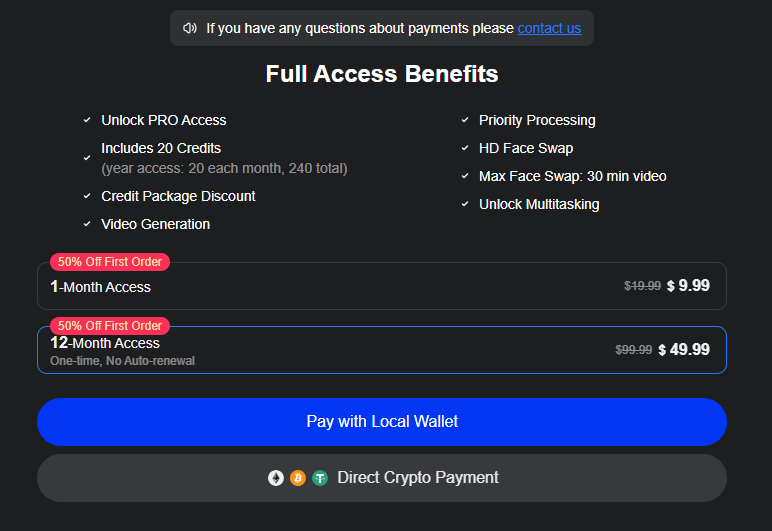
Deepswap offers two PRO access options: one month or twelve months. Both give you access to HD face swaps, AI video generation, and faster processing. You also receive 20 credits per month for creating and editing content.
The website currently offers 50% off your first order. Here are the prices shown on the official payment screen.
| Plan | Regular Price | Discounted Price | Included Credits |
| 1-Month Access | $19.99 | $9.99 | 20 credits |
| 12-Month Access | $99.99 | $49.99 | 20 credits each month, 240 total |
The one-month plan is a good starting point if you want to try Deepswap without paying for a full year. The twelve-month option costs $49.99 as a one-time payment and does not renew automatically.
Both plans include the same main benefits:
- PRO Access: Use the platform’s paid face swap and AI tools.
- 20 Monthly Credits: Pay for face swaps, character images, and videos.
- HD Face Swap: Create higher-quality face swaps.
- Video Generation: Make AI videos from images or text.
- 30-Minute Videos: Process face swap videos up to 30 minutes long.
- Priority Processing: Get faster access to editing tasks.
- Multitasking: Run several tasks without waiting for each one to finish.
- Credit Package Discounts: Save money when buying extra credits.
Deepswap accepts payments through local wallet options and direct cryptocurrency payments. The 50% discount applies to the first order, so check the current offer and any renewal terms before paying.
How Much Do Deepswap Credits Cost to Use?
Deepswap uses credits for almost every editing task. Simple photo swaps cost less than video generation, while longer videos and higher resolutions use more credits.
The official pricing screen lists these charges for face swaps and AI images.
| Feature | Credit Cost |
| Photo Face Swap | 0.1 credit per photo |
| GIF Face Swap | 1 credit per GIF |
| Video Face Swap | 1 credit per 15 seconds |
| VR Face Swap | 2 credits per 15 seconds |
| AI Character | 0.2 credit per photo |
| AI Image Tools | 0.1 credit per photo |
The face swap rates are the same for all supported models and HD options. VR Face Swap is currently listed at 2 credits per 15 seconds, down from the previous 6-credit rate.
AI video generation has separate prices based on the model and resolution. Deepswap offers several options for Image to Video, Text to Video, and Video Extend.
| Video Model | Resolution / Mode | Credit Cost |
| DeepVid 3.0 | Without audio | 1.5 credits / 5 sec |
| DeepVid 3.0 | With audio | Additional 0.2 credits / 5 sec |
| DeepEcho 2.0 Fast | 720p | 2.5 credits / 5 sec |
| DeepEcho 2.0 Fast | 1080p | 4.5 credits / 5 sec |
| DeepEcho 2.0 | 720p | 2 credits / 5 sec |
| DeepEcho 2.0 | 1080p | 3 credits / 5 sec |
Deepswap also has Reference to Video tools. These let you use reference media when creating a new clip.
| Reference to Video Model | 720p / 5 sec | 1080p / 5 sec |
| DeepEcho 2.0 Fast | 3.5 credits | 5 credits |
| DeepEcho 2.0 | 2.5 credits | 4 credits |
Adding a video reference increases the cost. The pricing screen lists an extra 3.5 or 5 credits for DeepEcho 2.0 Fast, depending on the resolution. Standard DeepEcho 2.0 adds 2.5 or 4 credits.
Video editing uses credits per second, rather than per five-second clip.
| Video Editing Model | 720p | 1080p |
| DeepEcho 2.0 Fast | 1 credit / sec | 1.5 credits / sec |
| DeepEcho 2.0 | 0.8 credit / sec | 1.2 credits / sec |
With 20 monthly credits, you can make up to 200 standard photo swaps or 100 AI Character images if you use all your credits for one feature. Video creation uses more credits, especially at 1080p.
For casual photo editing, the included credits can cover many tasks. If you plan to create longer videos or use advanced models often, you may need extra credit packs.
Deepswap Free vs Paid: What Can You Get?
You can visit Deepswap and check its main features before buying a plan. However, the service uses credits for face swapping, character images, and video tools.
What can you do for free?
Visitors can use the public website to:
- View face swap examples.
- Read about the available AI tools.
- Check credit charges and subscription prices.
- Create an account.
- Read the FAQ and service policies.
The current pricing page does not list a fixed monthly allowance of free credits.
What does Deepswap PRO include?
Both paid plans offer access to:
- HD face swapping for photos and videos.
- AI video generation.
- Video face swaps up to 30 minutes long.
- Priority processing.
- Multiple editing tasks.
- 20 credits each month.
- Discounts on extra credit packages.
- AI Character and image editing tools.
The main difference between the two plans is the payment period. One-month access costs $9.99 with the first-order discount. Twelve-month access costs $49.99 as a one-time payment, with 240 credits spread across the year.
For users who want to try a few face swaps or short videos, the one-month option is a practical choice. The annual plan offers a lower average monthly cost for people who expect to use Deepswap throughout the year.
Deepswap Pros and Cons
Deepswap offers several editing tools in one place. Its value depends on whether you mainly create photos or spend more credits on videos.
Deepswap is best for users who want visual content rather than a personal AI companion. The photo tools are easy to understand, while longer video projects need more planning.
Is Deepswap Legit or a Scam?
Deepswap is an established AI face editing service with an active website, working product pages, and public legal documents.
The platform has a Help Center, Terms of Service, Privacy Policy, and Refund Policy. Its terms state that the service is governed by Irish law. These documents explain how users can create content, pay for services, and manage their data.
What Are Deepswap’s Refund Rules?
Deepswap has a restricted refund policy.
Its dedicated Refund Policy allows users to request a refund within seven calendar days of payment if they haven’t used the purchased benefits. Its Terms of Service state a 14-day period for eligible unused purchases.
Both documents require unused benefits and exclude refunds for partially used plans or credit packs. The Help Center also states that cryptocurrency payments cannot be refunded. Users should confirm which policy applies to their purchase before paying.
How Does Deepswap Protect Your Photos?
Deepswap’s Privacy Policy explains that the service processes uploaded images, videos, facial data, and account information.
Its FAQ states that uploaded files are normally stored for up to 30 days. The period can restart when a file is used again. Generated results are normally stored for one week.
You can delete uploaded files and creations from your account. The service also provides ways to request account deletion.
Privacy matters when you work with real faces. Use images you own or have permission to edit, and avoid uploading private photos of other people.
Our verdict: Deepswap is a real AI editing service with documented tools and payment rules. It is worth considering for face swaps and video projects, but users should check the current PRO price, credit costs, and privacy policy before subscribing.
Deepswap FAQ
Can You Use Deepswap on an iPhone or Android?
Yes. Deepswap works through a mobile browser, so you can open its website on an iPhone or Android phone. A computer may be more comfortable when you edit long videos or work with several faces.
Can Deepswap Replace More Than One Face?
Yes. Deepswap advertises support for swapping up to six faces in the same video. You can select the faces you want to change. The number of faces and processing options depend on the uploaded media.
What Happens if a Deepswap Generation Fails?
The official FAQ says credits are returned automatically when a task fails. You can check your Credits History to confirm the adjustment. If the balance looks wrong, contact support.
How Do You Cancel a Deepswap Subscription?
Open your account settings and find the subscription controls. Website subscriptions can be managed through Account Info. If you subscribed through an app store, use that store’s cancellation system.
Can You Delete Your Deepswap Account?
Yes. Open your account settings and choose the deletion option. Deepswap warns that account removal is permanent and can remove saved creations and account benefits. Download any files you want to keep first.
Can You Use Deepswap Images for Commercial Projects?
Deepswap’s Terms state that users retain rights in their uploaded and created content, subject to other people’s rights and applicable laws. Commercial use also depends on the rights you hold to the original images. Get permission before using someone else’s face or copyrighted material.
How Can You Contact Deepswap Support?
You can reach Deepswap through its official Help Center or the support options on the website. Include your account email, order details, and a description of the issue if you have a billing or generation problem. Do not send passwords or full card details.