

A chat box can hide weak AI behind good writing. Pictures cannot. Faces, hands, clothes, poses, and small details are right there on the screen, so mistakes are much easier to spot. Unlucid AI works primarily as a creative image and video tool rather than an AI companion platform.
Its main tools cover image creation, photo edits, video generation, and ready-made video effects. You can work with realistic women, anime art, 3D looks, cartoons, and other styles. Adult content is also supported within the platform rules.
Unlucid AI Quick Verdict: Is It Better for Creators Than Chat Users?
Overall: 8.8/10
Unlucid AI makes the most sense for users who want to create and edit visual content rather than spend hours talking to an AI girlfriend. Image prompts have useful controls, face references help keep the same woman across new pictures, and the video toolkit is extensive.
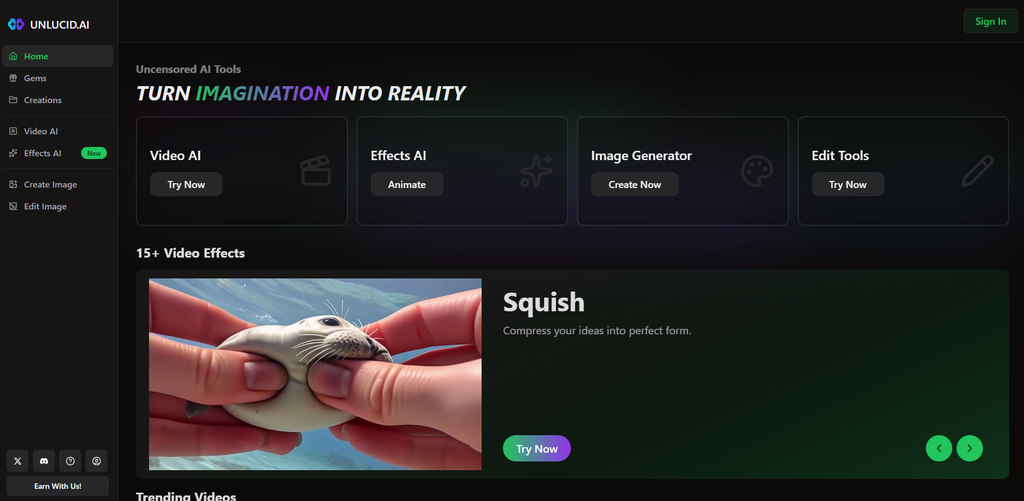
There are also 15+ video effects and tools for custom video prompts. Pricing is easy to understand because you buy Gems instead of paying for a monthly plan. The $59.99 pack gives the strongest value for heavy use. On the other hand, Unlucid AI is not built around AI chat, relationships, or long roleplay. If those are your main goals, this is the wrong type of product.
What Is Unlucid AI and What Can You Make With It?
Unlucid AI is a browser-based AI image and video platform. The service lets you create new pictures from text, edit existing images, turn still images into videos, and apply preset video effects. Its official Terms describe the product as a web tool for AI image creation, editing, and generation.
This is an important difference from Dream Companion, HeraHaven, or Nectar AI. Unlucid AI does not put a virtual relationship at the center of the site. You are the creator here. The woman in the image can stay the same across several results, but she is not a chatbot with a relationship history.
The service works on desktop and mobile browsers. Unlucid added a mobile-friendly layout for its creation tools, so you do not need a desktop computer to use the main features.
Unlucid AI Key Features: We Started With the Visual Tools
Unlucid AI makes much more sense when you judge it as a media generator. Image quality, editing controls, reference photos, prompts, and video options matter far more here than chat.
How Good Is Unlucid AI Image Generation?
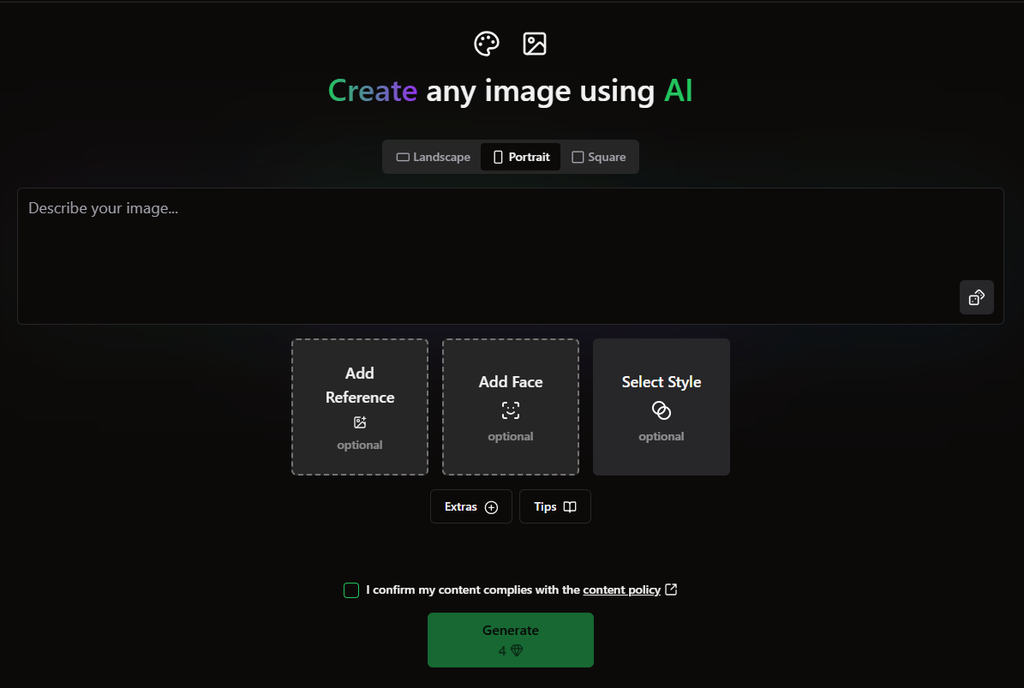
The image generator gives users several ways to control the result without turning the page into a wall of advanced settings. You describe what you want, then choose a visual style and other options.
Unlucid AI currently supports five main styles:
- Realistic.
- Cartoon.
- 3D Render.
- Anime.
- Pencil.
There is also more control inside the prompt itself. You can ask for a close-up, full-body picture, selfie, side view, POV angle, overhead shot, or many other camera positions. This is useful when you create female characters because the same description can look very different from a new angle.
The platform also includes High Resolution Upscale. It is meant to improve faces, hands, and small details after generation. Those areas often cause trouble in AI pictures, so an extra repair step is useful.
Can You Keep the Same Woman Across Unlucid AI Images?
Yes, and this is where Unlucid AI gets closer to character creation.
There is no classic girlfriend builder with sliders for personality, job, hobbies, or relationship type. Instead, visual consistency comes from Face Reference, Image Reference, prompts, and seed control.
Face Reference lets you use a face as the base for later generations. The service says this tool is made to keep facial traits consistent across several results. Users can also reuse a seed, which helps reproduce a similar image setup when the same settings are used.
This approach suits creators who care about appearance more than personality. You can make a recurring female character for several images without pretending she is a full AI girlfriend with a chat history.
Unlucid requires consent when a real person’s face is used as a reference. Its Terms ban non-consensual intimate images and the use of real faces without permission.
Can Unlucid AI Turn Images Into Videos?
Yes. Video is one of the biggest reasons to use Unlucid AI.
The platform can turn a starting image into a short video. You can use a custom text prompt or work with preset effects. Unlucid upgraded its Video AI system in 2025 with longer video options, faster processing, and custom prompts.
The current homepage also shows more than 15 video effects. Examples include:
- Dance.
- Slo-Mo Smash.
- Flying.
- Squish.
- Earth Zoom Out.
- Fist Punch.
- Simply Animate.
- Muscles.
- Birthday Party.
- Thor’s Thunder Eyes.
Some effects work better with certain starting pictures. Unlucid recommends a clear subject, simple background, and strong contrast for better results.
This is a much bigger video setup than a simple “animate photo” button.
What Can You Change With Unlucid AI Edit Tools?
You do not need to regenerate a whole image because one detail looks wrong. Unlucid AI has separate editing tools for smaller changes.
Current edit modes include:
- Removing objects.
- Adding or replacing objects.
- Changing clothes.
- Editing selected parts of an image.
You can mark the part you want to change with the brush or automatic selection tool. The rest of the picture stays outside the selected edit area.
That is handy when a generated woman looks good but the outfit, background, or one object does not fit your idea. Fixing one area can save Gems compared with starting again several times.
Does Unlucid AI Have Pre-Made Characters?
Not in the same way as an AI girlfriend service.
Unlucid AI has examples, trending videos, styles, and effect templates rather than a large dating-style gallery of women with names and personalities. The homepage shows recent visual examples and preset effects that can give you ideas for your own content.
For a user who wants to pick “Sophia, 24” and start a romantic chat, this setup may feel very different. For someone who wants to make a certain woman, outfit, pose, or scene, it gives much more direct control over the visual result.
Does Unlucid AI Have AI Chat?
Unlucid AI is not built around companion chat. Its current product menu focuses on Video AI, Effects AI, Image Generator, and Edit Tools. The official service description also centers on image creation and editing rather than chatbot conversations.
So there is no need to create a fake girlfriend profile before using the visual tools. You can go straight to an image prompt or upload a picture for editing.
This also means users who want memory, daily messages, or relationship-style conversations should see Unlucid as a different type of AI product.
Can You Roleplay With Unlucid AI?
Traditional text roleplay is not the focus here. There is no companion chat where a character keeps a role across a long conversation.
Instead, you can build a scene visually. A prompt can describe the woman, clothes, setting, camera angle, mood, and action. The video tool can then add movement to a still image.
It is closer to creating a roleplay scene than talking through one.
What NSFW Content Does Unlucid AI Allow?
Unlucid AI supports both sexually explicit and non-explicit AI content. Its Terms state that users can generate adult material through the platform’s AI tools. The service is restricted to people aged 18 or older.
There are clear limits. The rules ban sexual content involving minors, non-consensual intimate material, sexual deepfakes made without consent, sexual violence, and several other harmful categories. Real face references also require permission from the person shown.
That gives adult creators room to make NSFW AI images while keeping strong rules around real people and consent.
Unlucid AI Pricing: How Much Do Gems Cost?
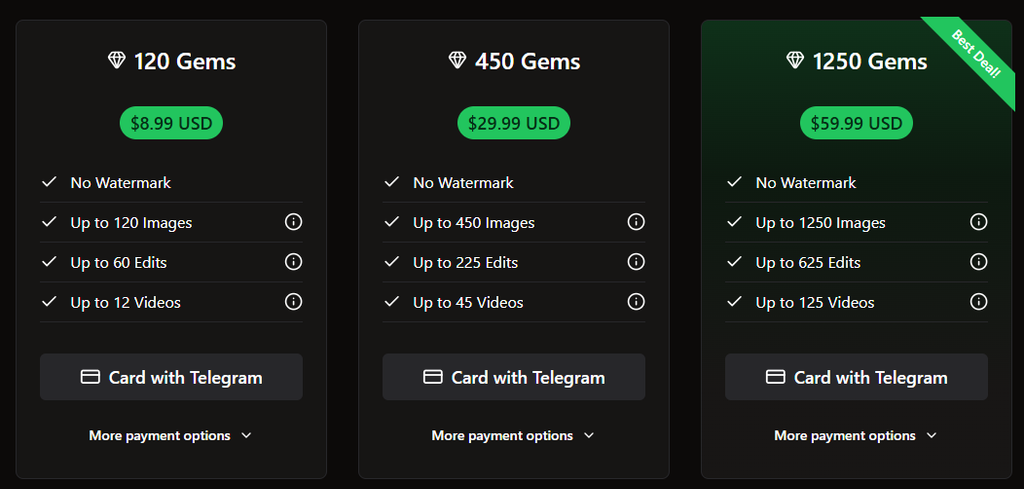
Unlucid AI uses Gems instead of monthly subscriptions. You buy a pack, spend the Gems on creation tools, and buy more when you need them. The service also offers daily free Gems.
The current paid options are:
| Gem pack | Price | Images | Edits | Videos |
| 120 Gems | $8.99 | Up to 120 | Up to 60 | Up to 12 |
| 450 Gems | $29.99 | Up to 450 | Up to 225 | Up to 45 |
| 1250 Gems | $59.99 | Up to 1,250 | Up to 625 | Up to 125 |
All three paid packs list No Watermark as a benefit. The 1,250-Gem option is marked “Best Deal” on the current pricing page.
The numbers are listed as “up to” because different tools can use Gems at different rates. One Gem can cover an image in the simplest case, while editing and video use more.
What Can You Make With Unlucid AI for Free?
You do not have to buy Gems on your first visit. Unlucid AI gives users a way to claim free Gems each day. The exact free amount can change, so it is better to treat this as test access rather than a fixed free plan.
With free Gems, you can:
- Try AI image generation.
- Test prompts and visual styles.
- See how the creation screen works.
- Try supported edits when you have enough Gems.
- Save paid Gem packs for later instead of starting with a purchase.
This setup is different from a normal free subscription. You get a small currency balance rather than a separate feature tier.
What Changes After You Buy Unlucid AI Gems?
Buying Gems gives you much more room to create, and paid generations come without the watermark listed on the Gem page.
Paid Gems can be used for:
- AI image creation.
- High-volume image generation.
- Image edits.
- Video creation.
- Video effects.
- Other paid creation actions inside the platform.
The 120-Gem pack makes sense for a small test. The 450-Gem option is better if you already know you like the generator. The 1,250-Gem pack has the lowest cost per Gem and is the most practical choice for frequent video work.
Unlucid AI Pros and Cons for Visual Creators
| Pros | Cons |
| Strong focus on AI images and video | No AI girlfriend chat |
| Five image styles plus prompt controls | No relationship or personality system |
| Face Reference helps keep characters consistent | Video uses Gems much faster than images |
| Image editing can fix one part without a full remake | Free use depends on daily Gem amounts |
| 15+ ready-made video effects | Small Gem pack has weaker value per Gem |
| Custom text-to-video prompts are available | |
| No monthly subscription is required |
Is Unlucid AI Legit and Safe to Use?
Unlucid AI is a working browser-based AI creation service with public pricing, account tools, image generation, video features, tutorials, Terms of Service, and a Privacy Policy. Its Terms were last updated on November 26, 2025 and explain how Gems, payments, user content, and account access work.
The service also gives users ownership of the content they generate, as long as their use follows the rules and local law. Generated content stored on Unlucid servers is encrypted during temporary storage and is removed from those servers within up to 48 hours, according to the Terms.
There are also clear rules for face references and adult images. Users must be 18+, and real people can only be used with proper consent. That matters more on an adult image platform than it would on a normal photo filter app.
Unlucid AI FAQ for New Users
Does Unlucid AI Have a Monthly Subscription?
No standard monthly plan is required. Unlucid AI currently sells Gems in packs of 120, 450, and 1,250. You spend those Gems when you use image, editing, or video tools. Free Gems are also available through the daily claim system.
How Much Is the Cheapest Unlucid AI Gem Pack?
The smallest paid pack costs $8.99 for 120 Gems. It can cover up to 120 images, 60 edits, or 12 videos, depending on how you spend the balance. Paid generations from this pack are listed without a watermark.
Can Unlucid AI Keep the Same Face in Different Pictures?
Yes. Face Reference is made for this job. You can use a reference to keep facial traits closer across several generations. Seed control and Image Reference can also help with consistency. Real face references require consent under the platform rules.
Can I Upload My Own Picture to Unlucid AI?
Yes. Reference images can guide new generations, and existing pictures can also be used with the editing and video tools. Users must have the rights and consent needed for any real person’s image they upload.
Does Unlucid AI Work on a Phone?
Yes. Unlucid AI is browser-based, and the company added a mobile-friendly interface for its generation tools. You can use the main service from a supported mobile browser rather than installing a separate desktop program.
Can Unlucid AI Remove or Change Clothes in a Picture?
The editing suite includes a Change Clothing mode. It also has tools for removing objects and adding or replacing selected items. You choose the area you want to edit, then the AI changes that section while leaving the rest of the image alone.
Are Unlucid AI Images Stored Forever?
The Terms state that generated content is temporarily stored on secure servers for processing and access, with server copies removed within up to 48 hours. Some content may remain locally in the user’s browser.